$99Lifetime access. Pay once. 99 of 100 left.

Your production database, running on your Mac.

dbplex is a Mac app that copies your Supabase, Firebase, PostgreSQL, MySQL, MongoDB or any of 12 databases to localhost, real data included. Run your tests, try the migration and let your AI agent loose on it. Production is never written to.

For Apple Silicon Macs. 7 days free with every feature. No card and no account.

dbplex - Clone your production database to your Mac in one click | Product Hunt

Agent

Running your new migration on the copy.

DROP DATABASE production;

You:

BRO

HAVE YOU DELETED MY DATABASE

Read

Agent

Relax, that was the copy on your Mac.

The real one never noticed.

Spoiler: 0042 is not safe to run.

Production untouched. dbplex only reads it.

  • Supabase
  • Firebase
  • PostgreSQL
  • MySQL
  • MongoDB
  • Turso
  • SQLite
  • Redis
  • MariaDB
  • DynamoDB
  • SQL Server
  • Oracle
  • Neon
  • Railway
  • Render
  • PlanetScale
  • AWS RDS
  • Google Cloud SQL
  • Azure Database
  • DigitalOcean
  • MongoDB Atlas
  • Upstash
  • Aiven
  • Dump files

One app, all your databases

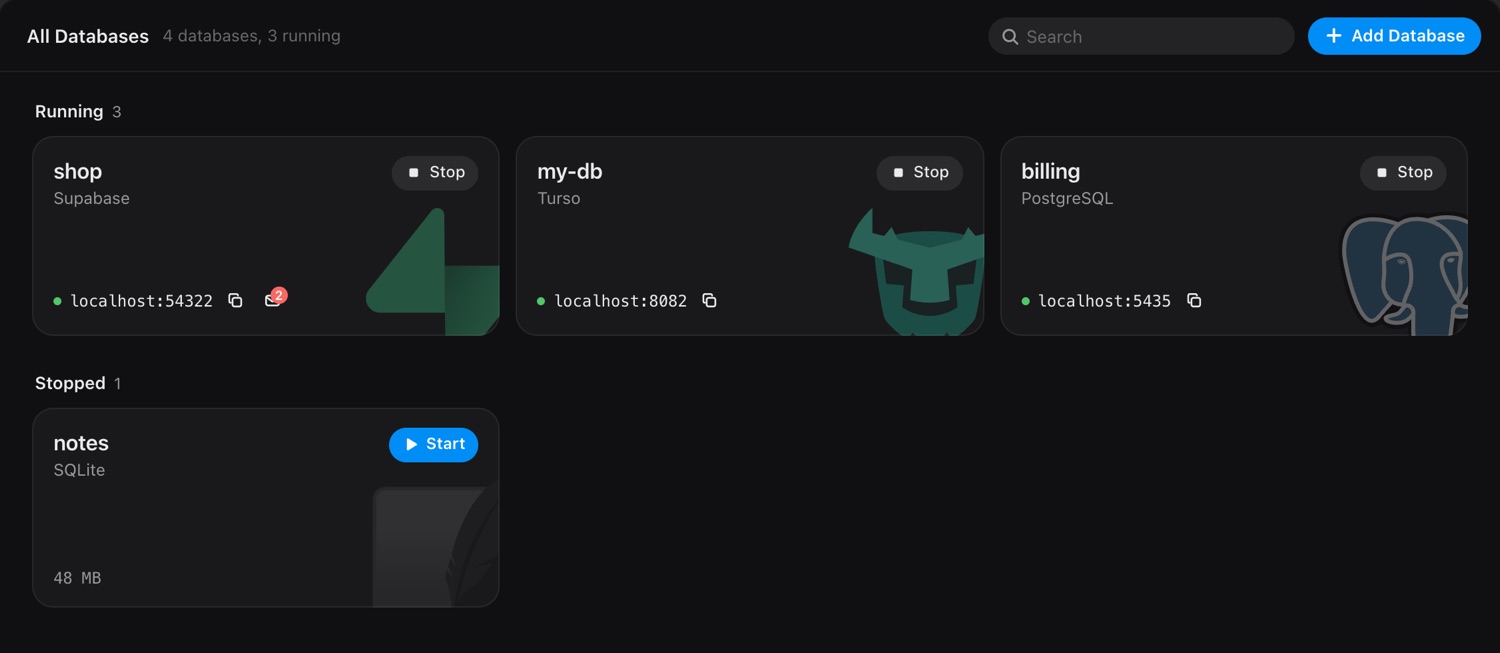
Your Supabase, Firebase, PostgreSQL, MongoDB and Redis copies sit side by side in one window, so you always know what's running and can stop what isn't. Each one is a real database server on your Mac, with its own localhost URL.

A Supabase copy also brings the auth users, the storage files and the edge functions, and a local mailbox catches every email your app sends. Nothing is ever written back to production, so you can run the migration, delete rows or try the risky idea without a single customer noticing.

The dbplex window listing local copies of Supabase, Turso, PostgreSQL and SQLite databases, each with its localhost address

How does it work?

  1. Paste the connection detailsA Supabase project, a Postgres URL, a Turso token or a file. They're kept in your Keychain.
  2. Click Pulldbplex only reads production. Emails, names and other personal columns can be masked on the way in.
  3. Use the localhost URLPoint your app, your tests or your agent at it. When you want today's data, click Refresh.

Try it. This is the real app.

1 of 4Click Add Database, pick one, click each field to fill it, then Pull and Start.

It connects to nothing and the rows are made up, so click the fields instead of pasting real credentials.dbplex is a Mac app. Open this page on your Mac to try it live.

Why not the Supabase CLI, Docker or a local Postgres?

Those tools give you a database, but it starts empty and lives in a terminal you have to remember. So most people skip them and change production directly.

The CLI or Dockerdbplex
Your dataStarts empty. You write seed scripts or restore a dump by hand.Starts with your real tables and rows, masked where you choose.
Back to productionYou write the migration by hand and hope it matches what you changed.The Changes tab writes it from the difference, in the order it must run.
SupabaseTables only, unless you script auth users and storage yourself.Auth users, storage files, edge functions and settings come too.
Where it runsA terminal or a Docker container per project, easy to leave running and forget.One window lists every copy, running or stopped.
Fresh dataDump and restore again.One Refresh button.
AI agentsYou hand them production, or they refuse to touch it.A copy of their own over MCP, without your production credentials.
ProductionOne wrong migration away from an outage.Only ever read.

A database your AI agent is allowed to break

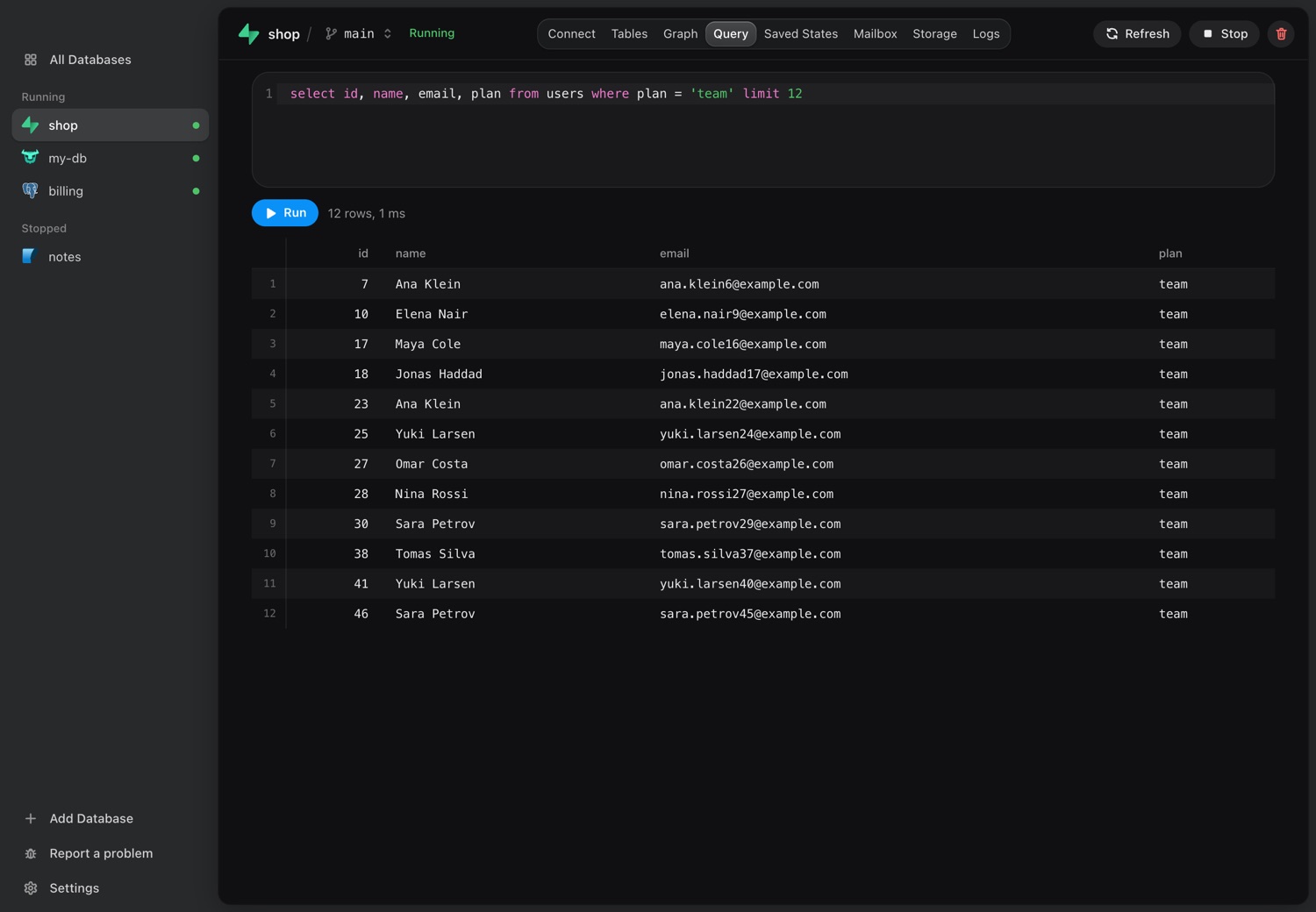
Claude Code, Cursor and other coding agents often refuse to touch production, and they're right to. dbplex gives them a copy they can break. Its built-in MCP server lets an agent run SQL, rehearse and run migrations, and branch its own copy. Agents never see your production credentials, and personal columns can be masked before an agent reads a single row.

Add it to Claude Code, Cursor, Codex or Windsurf from Settings.

The Query screen of dbplex with a SQL query and its result on a local copy
  • Run SQL and read rowsOn real rows, on the copy.
  • Write and rehearse the migrationGet the script for its changes, then try it on a throwaway copy.
  • Make its own branchEach agent can work on a copy of its own.
  • Save and restore statesRoll back and try again.
  • Read logs and caught emailsThe server log, and the sign-up emails Supabase sent, caught before they reach anyone.
  • Refresh from productionStart over with today's data.

See what changed against production, and get the migration script

When the work on your copy is done, the Changes tab compares its schema with production, table by table, like a pull request: what production has now in red, what your copy brings in green. dbplex reads only the schema, and only when you ask.

Then it writes the migration script in the order it must run: tables, triggers, backfills, indexes, then drops. A drop stays off until you turn it on, a rename is asked rather than guessed, and a column someone added to production since your pull is left alone. Rehearse the script on a throwaway copy of your data, then run it yourself. dbplex never runs it on production.

Your AI agent gets the same script over MCP. Works with Supabase, PostgreSQL, MySQL, MariaDB and Turso, and rehearsing with all of them but Supabase. The migration script is in beta.

Which databases can dbplex copy?

Twelve databases, and the hosts they run on. Paste the address your provider gives you.

Scheduled backups of production, kept on your Mac

Each backup is one zip, pulled read-only and kept in a folder you choose, out of your provider's reach.

  • Daily or weeklyAt the day and time you pick, even with the window closed.
  • A folder you chooseOn your Mac or a drive, keeping the last 10 or as many as you set.
  • Opens as a new copyAny backup opens as a new local copy.

Everything in one window

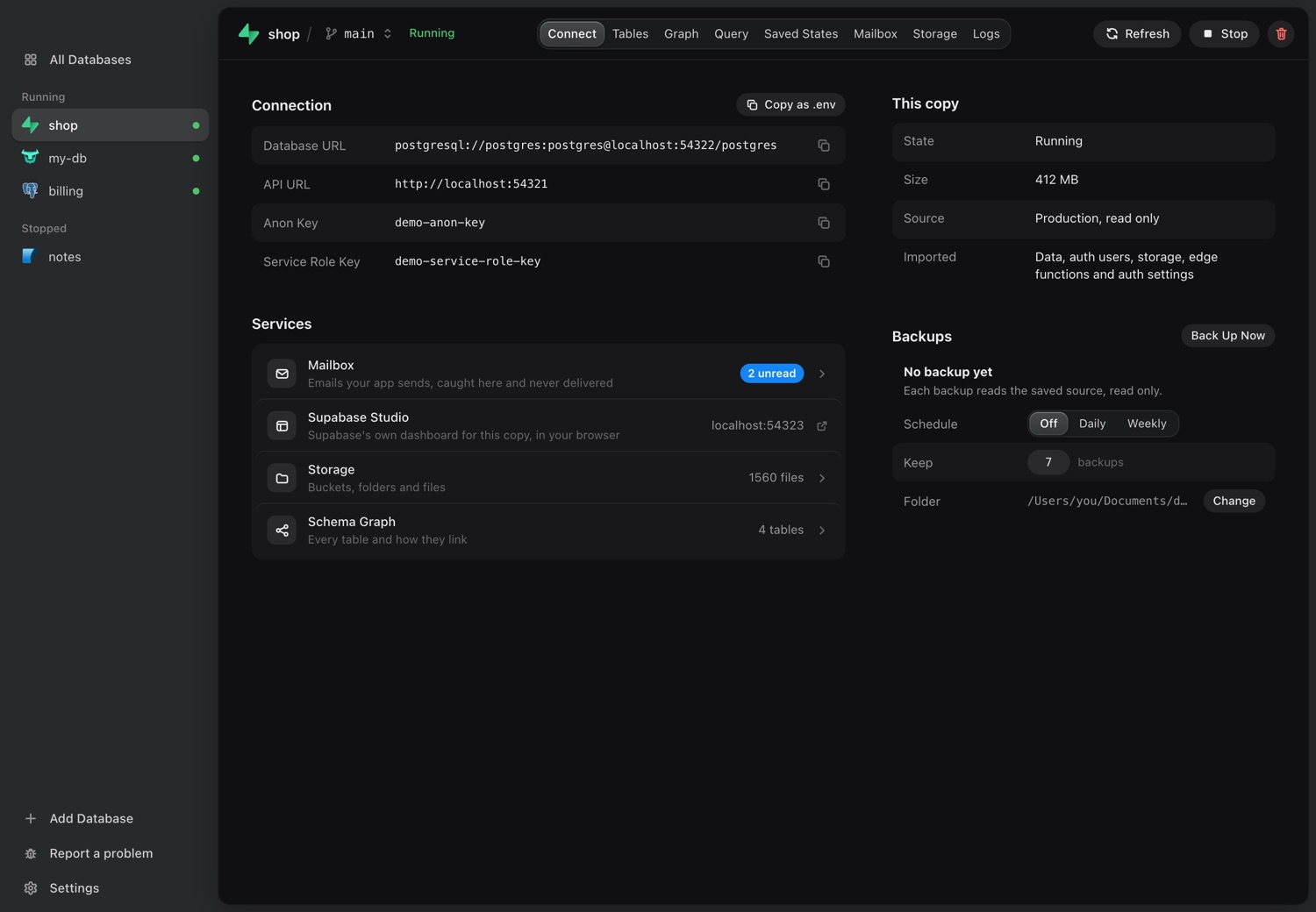
The Connect screen with the database URL, the API URL, the keys and the services

Everything you need to connect.

The database URL, the API URL and the keys are on one screen, or copy them all as a .env file.

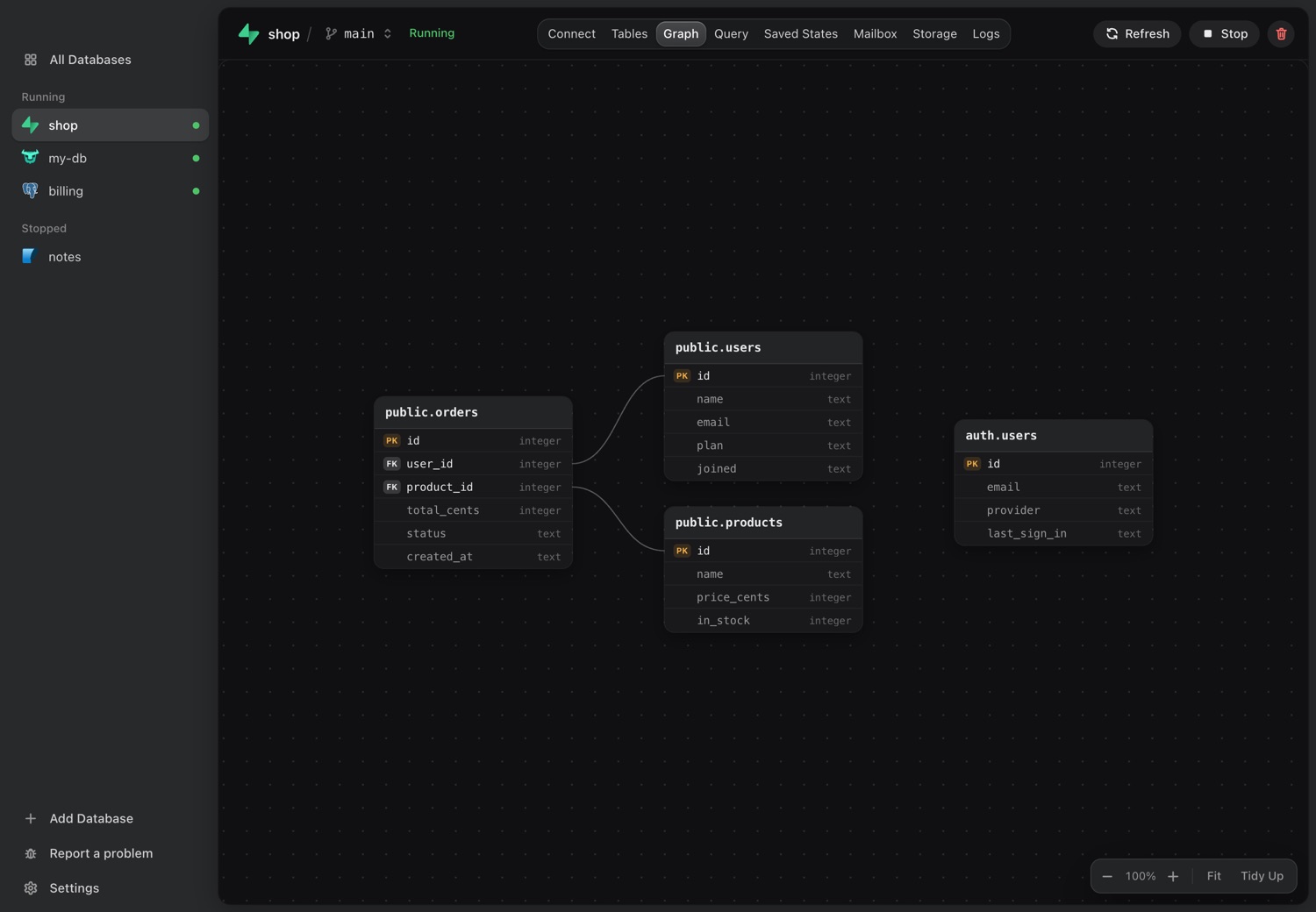
See how your tables fit together.

The schema graph draws every table and how it links to the others, right from your copy.

The schema graph of a local copy, with every table and the links between them

Can dbplex change your production database?

No. It only reads.

UPDATE production SET data = NULL;

ERROR: dbplex only reads production. 0 rows changed.

dbplex reads production to make your copy. It cannot push, sync or write anything back.

ProductionPostgreSQLpostgresql://app:••••••@db.example.com/app
Only reads
Never writes back
Running on your MacYour local copypostgresql://postgres@localhost:5433/app
Stays on your MacCopies listen on your own machine only.
Credentials in your KeychainThey are only sent to the database they belong to.

SELECT * FROM cron.job;

Cron jobs and webhooks come with a copy and can still email real users, so dbplex lists every one that can reach outside after each pull.

How much does dbplex cost?

Try it free. Then pick a plan. 7 days with every feature. No card and no account.

Monthly

For a short project.

$12.99a month
Stop whenever you likeThe app locks when the paid month ends.
Buy monthly
  • Every feature, on 3 Macs
  • All updates while you pay
  • Your data stays on your Mac

Need it past 6 months? From month 7, a license costs less, and the app keeps working after you stop.

Save 49% on 12 months of monthly

License

For everyday use. The app is yours.

$79.99first year
  1. $79.99Year 1
  2. $59.99Year 2
  3. $39.99Year 3+
Buy license
  • Every feature, on 3 Macs
  • 1 year of updates with each payment
  • Keeps working if you stop renewing

Renew with no gap and the price falls. The lower prices are for renewing before your updates end. If your license runs out, the next year is $79.99 again.

Lifetime access

First 100 buyers only.

$99once, forever
Get lifetime

99of 100 left.

When the 100th sells, lifetime is gone.

  • Every feature, on 3 Macs
  • Updates forever
  • Hot patch build support

Two years of a license cost $139.98. Eight months of monthly cost $103.92.

Teams

Buying for your company? Tell us how many people and we reply with a price.

Email us

Not sure yet?

Use everything for 7 days, then enter a key if you want to keep it.

Download for Mac

All payments are final, so try it first. An old version can stop pulling when a provider changes something, and fixing that takes an update. For Apple Silicon Macs. Read the terms and the privacy policy.

Questions about dbplex

Can it change my production database?

dbplex only reads from production. The code that talks to your source can read and dump, and the app has no push, sync or copy back. Keep in mind that a copy behaves like the original, so scheduled jobs and webhooks that came with it can still call outside services. dbplex scans each pull and warns you about them.

What do I need to paste for Supabase?

Your project URL, database password, service role key and access token. The access token is only needed for edge functions and auth settings, so you can leave it out if you turn those off.

Do I need Docker?

Only for Supabase, SQL Server and Oracle. Supabase runs the official stack in containers, and SQL Server and Oracle run in Docker too, so those need Docker Desktop. dbplex starts and manages the containers, and you never see a compose file. Every other database runs without Docker.

Which databases can I copy?

Supabase, Firebase (Firestore), PostgreSQL, MySQL, MongoDB, Turso, SQLite, Redis, MariaDB, DynamoDB, SQL Server and Oracle. PostgreSQL works with any connection string you can reach, including Neon, Railway, Render, AWS RDS, Google Cloud SQL, Azure Database, DigitalOcean, Aiven and PlanetScale. MongoDB includes MongoDB Atlas, and Redis includes Upstash. You can also restore a dump file. For Firebase, Auth users, Storage files and other named databases are not copied.

Can dbplex write the migration script for my changes?

Yes, for Supabase, PostgreSQL, MySQL, MariaDB and Turso. The Changes tab compares your copy's schema with production and writes the script in the order it must run, with drops left off until you turn them on. On PostgreSQL, MySQL, MariaDB and Turso you can rehearse it on a throwaway copy of your data first. Your AI agent can get the same script over MCP. dbplex never runs it on production, and the script is in beta.

How do I get new data from production?

Press Refresh from Production. It replaces the local copy with a fresh pull using the credentials and choices you already saved. If you changed the copy since the last pull, it warns you first.

What about secrets that can't be read back?

Values like edge function secrets and OAuth client secrets can't be read from Supabase. dbplex lists what is missing and gives you a place to enter it.

Where do my data and credentials go?

Copies stay on your Mac and listen on your own machine only. Credentials are kept in the Mac Keychain and are only sent to the database they belong to.

Can my AI agent use it?

Yes. dbplex comes with an MCP server, which you add to Claude Code, Cursor, Codex or Windsurf from Settings. An agent can run SQL, rehearse and run migrations, make a branch of its own, save and restore states, read logs and refresh from production. Agents act on local copies only and never see your source credentials. Query results do go to your agent's AI provider, so choose what you import with that in mind.

Can I keep personal data away from my AI agent?

Yes. Query results an agent reads go to its AI provider, so you can mask emails, names and other personal columns as the copy is pulled. dbplex suggests which columns to mask, and you confirm each one.

Does it run on Windows or Linux?

Not yet. dbplex runs on Macs with Apple Silicon.

Is there a free trial?

Yes. 7 days with every feature, and no card or account. Download the app and start. Each Mac gets one trial.

What is the difference between monthly and a license?

Monthly is for a short project: updates are included, and the app locks when you stop paying. A license is yours: it comes with 1 year of updates, and if you stop renewing, the app keeps working and only the updates end.

What does renewing a license cost?

Year 2 is $59.99, then $39.99 a year, as long as you renew with no gap. Once your updates have ended, the next year is $79.99 again. We email you before your updates end, and you can renew at /account. To renew automatically, tick the box when you buy or turn it on at /account, and we email you before each charge.

What happens if I stop paying?

On a license or lifetime, nothing stops. You keep the version you have, though an old version can stop pulling when a provider changes something, and fixing that takes an update. On monthly, the app locks and its copies stop when the paid month ends. Nothing is deleted, and paying again brings it back.

Can I buy for my team?

Yes. Email s.castellitti.dev@gmail.com and tell us how many people. We reply with a price, and you get one key for the whole team.

How many Macs can I use?

Up to 3, and they can be changed at /account.

I lost my key.

Go to /account.

Can I get a refund?

No, all payments are final, so try it during the 7-day trial first.

Break prod. Locally.

Try it on your own database for 7 days.